If the insect screen panel on your 100 Series gliding patio door feels too tight or too loose during operation, or isn't sliding the way you prefer, you may need to adjust or replace the insect screen's rollers.
How to Adjust and Replace Rollers on Andersen® 100 Series Gliding Patio Door Insect Screens
Gliding insect screens for 100 Series gliding patio doors use two rollers at the top and two at the bottom.
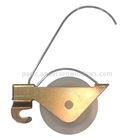
100 Series Gliding Patio Door Insect Screen Roller
This Article Will Help You:
- Adjust your rollers to tighten or loosen the fit of your insect screen.
- Replace broken insect screen rollers.
Note: If you would like help from a local Service Provider rather than completing the steps below yourself, see Locating Andersen® Window and Patio Door Service Providers.
Safety Warning
Tools and Supplies Needed
- Safety glasses
- Screwdriver
Let's Get Started
Adjust Tension of Insect Screen Rollers
- For a tighter insect screen panel fit, increase roller tension by turning the adjustment screw clockwise.
- For a looser insect screen panel fit, decrease roller tension by turning the adjustment screw counter-clockwise.
|
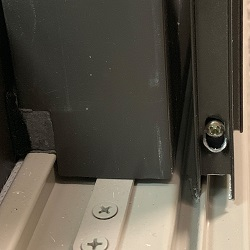
Adjustment Screw
|
Replace Gliding Insect Screen Rollers
If you have a broken insect screen roller or adjusting your rollers did not improve operation, then you may need to order replacement rollers. Replacement Insect Screen Rollers  are available for purchase online from the Andersen Parts Store.
To install the replacement rollers:
- Firmly grip the roller with your thumb and index finger.
- Push down on the roller to disengage the metal hook.
- Pull the roller toward the center of the insect screen until the roller disengages and comes loose from the insect screen.
- Insert the new roller into the pocket within the insect screen frame by reversing the movements made in step three (3).
- Pull up on the roller to engage the metal hook. The roller is now snapped into place.
For additional questions or assistance, Contact Andersen® Windows and Doors.
©2026 Andersen Corporation. All rights reserved.