This article will help you identify the type of glass used in your Andersen® windows and patio doors. You will find sample images of common glass codes to guide you through the process.
Locate Andersen® Glass Logo
Start by locating the Andersen® logo, which is etched directly onto the glass surface. It is usually found in one (1) of the lower corners of the window or patio door. If the etching is hard to read, try these tips to make it more visible:
The Andersen® logo is etched directly onto the glass surface, typically positioned in one (1) of the lower corners. If the etching is faint or hard to see, try these simple tips to improve visibility:
- Use a magnifying glass to enhance small details
- Take a digital photo and zoom in on the image
- Shine a flashlight across the glass to highlight the etching
- Hold a dark piece of paper behind the glass to reduce glare and improve contrast
Identify Glass Type
Around the Andersen glass logo will be a series of letters and numbers indicating the glass type. This notation varies by glass type and may include, but is not limited to, HP Low-E, High-Performance (HP), HP Sun, HP Smart Sun, and Dual-Pane Clear. The Andersen® logo does not always indicate the specialty glass for a window or patio door. Tinted or patterned glass types will not be marked.

Example of a Glass Code
Window and Patio Door Vintage (Manufacturing Date)
Andersen glass logo etchings will include the product's vintage, also known as the manufacturing date, which shows when the window or patio door was made or when a window sash or door panel was replaced. On logos that match the image above, the vintage is identified on the right-hand side of the logo, where YYMMDD (YEAR, MONTH, DATE) is listed. You'll see this style (YYMMDD) on newer windows and patio doors.
On older glass logos, the vintage may appear differently. An easy way to find the manufacturing year in these logos is to look for two (2) numbers grouped together (for example: "06," "99," "95). Additional logo examples can be seen in Glass Types  .
.
EXAMPLE: The glass logo below shows another way a manufacturing date may appear in the glass logo. In this image, the vintage is on the right-hand side, but listed as 1-06. This means the window or patio door was manufactured during the first quarter of 2006.

Example of a Glass Code Vintage Location
Tempering Code
Depending on the window or patio door type, the unit may have a tempering code etched into the glass surface. The tempering code does not identify the glass type. Please locate the Andersen® logo to determine the glass type.
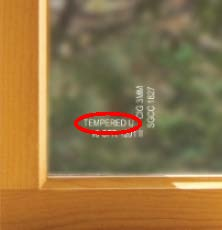
Tempered Glass Code
FX-Number
Since 2002, Andersen has etched FX-Numbers directly onto the glass of Flexiframe®, Arch, and Springline™ units for easy identification. However, Monolithic Impact-Resistant Glass does not include an FX-Number etching.
If your window or patio door was manufactured before 2002, the FX-Number might be located elsewhere, such as under the sill stop or on the glass label. For help locating and reading your product label, review our Identify Your Andersen® Window or Patio Door Using a Product ID Label article.

Example of an FX-Number on the Sill Stop

Example FX Order Number
Contact Andersen® Windows and Doors if unsure about the glass type or where to find the Andersen® logo.
©2026 Andersen Corporation. All rights reserved.