Andersen® casement windows feature decorative interior trim stops that provide a clean, finished appearance inside the unit. Individual trim stops can be replaced.
How to Identify the Correct Replacement Casement Window Trim Stop
The steps below will help you figure out and order the correct replacement trim stops for your casement window.
Note: As of February 2022, Andersen® offers two stop styles: traditional and contemporary.
|
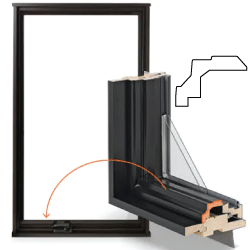
Andersen® 400 Series Traditional Casement Sill Stop
|
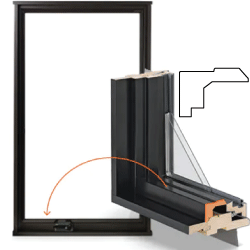
Andersen® 400 Series Contemporary Casement Sill Stop
|
This Article Will Help You:
- Identify the correct type of replacement stop for your casement window.
Let's Get Started
Before ordering replacement stops for your Andersen® casement window, you'll need to gather a few key details.
1. Determine Series of Window
If you need help identifying the type of casement window you have, or want to identify a different Andersen® product, use our Identify Your Product tool.
Important: Only stops for E-Series, A-Series, and 400 Series casement windows are available to order.
If you need a replacement trim stop and have a 200 or 100 Series window, Contact Andersen® Windows and Doors.
2. Determine Window Handing
If you have a stationary casement or picture window (it does not open or close), skip this step. You’ll only need the window’s vintage and size to place an order.
If you have a venting window (it opens and closes), figure out your window’s handing from the exterior of your home. The window's handing is determined by where the hinges are located when you're looking at your window from outside your house.
- Check whether it’s left-handed or right-handed—this will match the stops’ handing.
- For example, a left-handed window will have hinges on the left-hand side when looking at the window from outside and will require left-handed trim stops .
For more information, see Casement Window Unit and Replacement Part Handing.
3. Determine Operator Type
The type of operator your window uses also matters when ordering the correct trim stop. The operator is the hardware that opens and closes the window.
|
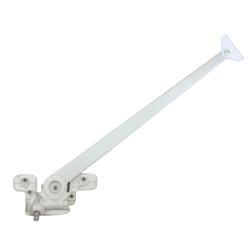
Right-Hand Straight-Arm Operator
|
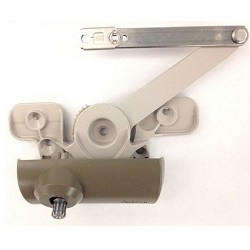
Split-Arm Operator
|
4. Determine Existing Stop's Finish
When ordering a replacement trim stop, it is helpful to know the finish of the existing stop. Units made from 1966 to 1998 came with only unfinished stops, while painted options became available starting in 1999.
Need Parts?
Once you have determined the information above, we can assist you with placing an order. To do so, see Contact Andersen® Windows and Doors.
Related Articles
For instructions on installing a 400 Series casement window replacement trim stop, see Stop Replacement Instructions for Andersen® 400 Series Casement Windows.
©2026 Andersen Corporation. All rights reserved.